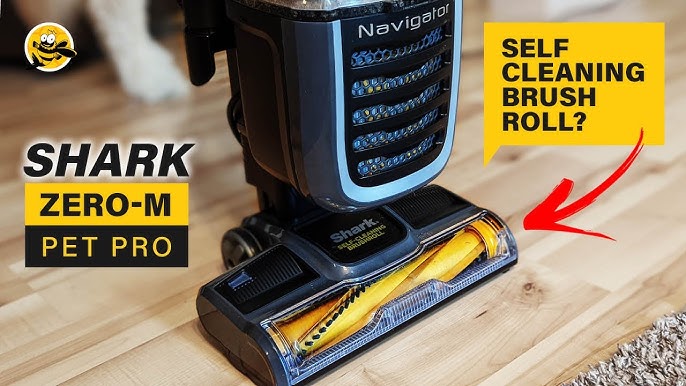
Your Shark Navigator is a cleaning powerhouse. But that power depends on a single, critical component: the beater bar. When hair, string, and carpet fibers wrap around it, performance plummets. You’ll notice less suction, strange noises, or a brush roll that stops spinning entirely.
Regular cleaning isn’t just a suggestionit’s essential maintenance. This guide walks you through the entire process. You’ll learn how to safely remove, clean, and reassemble the beater bar on your Shark Navigator. For a thorough clean, having the right tool helps. Many professionals recommend using a dedicated Genuine Eureka Sanitaire cleaning tool, which is designed to cut through tough wraps without damaging the brush bristles.

What is the Shark Navigator Beater Bar and Why Clean It?
Often called the brush roll, the beater bar is the rotating cylinder at the base of your vacuum. Its job is dual-purpose: the bristles agitate carpet fibers to loosen deep-down dirt, while the plastic fins help channel debris into the suction path. This action is what gives your Shark Navigator its deep-cleaning capability.
Over time, hair and threads inevitably wrap around the bar’s ends and bristles. This hair wrap creates a physical barrier. The brush roll can’t spin freely, the motor strains, and suction is dramatically reduced. Ignoring it can lead to a broken vacuum belt or even motor damage. Regular debris removal prevents these issues, keeping your vacuum running like new for years. This is a key part of any comprehensive vacuum maintenance routine.
Tools You’ll Need for Cleaning
You don’t need specialized gear. Most items are already in your home.
- Scissors or Seam Ripper: Essential for cutting through hair and thread. A seam ripper offers more control.
- Phillips Screwdriver: Needed to remove the bottom plate and access the beater bar on most Navigator models.
- Lint Roller or Damp Cloth: For wiping down the brush housing and picking up fine dust.
- Cleaning Tool: While scissors work, a purpose-built tool like the Genuine Eureka Sanitaire makes the job faster and safer for the brush bristles.
Critical Safety Step: Always unplug your vacuum before starting any maintenance. This non-negotiable step protects you and the machine’s electronics.
Identifying Your Specific Shark Navigator Model
Shark Navigator covers a family of vacuums. The core cleaning process is similar, but access points can vary. Check the model number on the back or bottom of the vacuum (e.g., NV352, NV356E, NV586). Knowing your exact model helps you look up visual guides. The process for a Shark Navigator Lift-Away is virtually identical to a standard upright, but the Lift-Away function can make handling easier.
Step-by-Step Cleaning Instructions
Follow this step by step guide to cleaning shark vacuum roller. Take your time, especially the first time.
1. Accessing the Beater Bar
Place your vacuum on its back. Locate the screws on the bottom plateusually two to four Phillips-head screws. Remove them and set them aside safely. Gently lift off the bottom cover to reveal the brush roll chamber.
2. Removing the Beater Bar
You’ll see the brush roll seated between two plastic housing arms. On each end, there are end caps that lock the bar in place. Press the tabs on these end caps inward and lift the beater bar straight up and out. This is the core of shark navigator beater bar removal.
3. Cleaning the Brush Roll and Chamber
- Cut and Pull: Use your scissors or cleaning tool to slice through hair and thread wrapped around the brush roll, especially at the ends. Pull the cut material away.
- Inspect the Belt: With the bar removed, check the vacuum belt on the motor spindle. It should be snug, not stretched or cracked. A worn belt is a common reason your brush roll stops spinning.
- Clear the Chamber: Use the lint roller or a damp cloth to remove all loose dust, hair, and debris from the now-empty brush chamber. This prevents immediate re-clogging.
4. Reassembly
Slide the clean beater bar back into the housing, ensuring the end caps click securely into place. Replace the bottom cover and tighten all screws firmly. Do not over-tighten. Plug in your vacuum and test it on a bare floor to ensure the brush is spinning smoothly and quietly.
Troubleshooting Common Beater Bar Problems
Even after cleaning, you might encounter issues. Heres how to unclog shark vacuum brush problems for good.
“Why is my Shark Navigator brush roll not spinning?”
This frequent question has a few likely answers. First, re-check that all hair wraps are completely removedeven a small thread can jam the mechanism. Second, inspect the drive belt. If it’s slipped off, stretched, or broken, it won’t turn the brush. Replacement belts are inexpensive and easy to install. Finally, ensure the end caps are fully locked; an improperly seated bar won’t engage.
Unusual Noises or Burning Smells
Grinding or screeching noises after cleaning often mean a foreign object (like a staple or rock) is still lodged in the chamber or brush roll. A burning smell indicates the motor is straining against a blockage or a seized bearing. Immediately turn off and unplug the vacuum to investigate further.
Warranty Considerations
A common concern is whether self-cleaning voids your warranty. For Shark, routine user maintenance like cleaning the beater bar and replacing belts does not void the warranty. However, damaging components during the process might. If you’re unsure, consult your manual or the official Shark customer support site for model-specific guidance.
Maintenance Tips to Prevent Future Issues
Proactive care minimizes deep cleans. Integrate these habits into your routine.
- Pre-Check Floors: Quickly pick up large strings, hair ties, and ribbons before vacuuming. They are the primary culprits of hair wrap.
- Monthly Visual Inspections: Flip your vacuum and check the brush roll for buildup. A quick 2-minute cut-and-pull session prevents major clogs.
- Belt Replacement Schedule: Plan to replace the drive belt every 6-12 months with regular use. It’s a wear item.
- Model Awareness: The process for a Navigator is generally simpler than for a Shark Rotator or Apex model, which may have more advanced brush roll systems. Always refer to your specific manual.
For those with pets or high-pile carpets, consider a model designed for the challenge. The best Shark Navigator upright with HEPA filter often includes enhanced brush roll systems and superior filtration, making overall maintenance easier.
Keeping Your Navigator in Peak Condition
A clean beater bar is the heartbeat of your Shark Navigator’s performance. By following this shark vacuum maintenance guide, you directly combat the most common failure points. The process is straightforward: unplug, access, remove, clean, and reassemble. Regular attention to the brush roll not only solves immediate problems like loss of suction but also extends the life of the belt and motor. Your vacuum is a tool that works hard for you. A little maintenance in return ensures it stays reliable, saving you time, money, and frustration on the path to a cleaner home.