
Keeping floors clean requires consistent effort. A robot vacuum can automate that daily task, freeing up your time for more important things. The Shark Ion Robot R75 enters the market as a Wi-Fi-connected option designed to handle both carpets and hard floors. Does its feature set deliver a truly hands-free clean? We put it to the test.
This review breaks down the Shark Ion R75’s performance, setup, and smart features. We’ll see how it stacks up against popular competitors and determine exactly who will get the most value from this robotic helper.
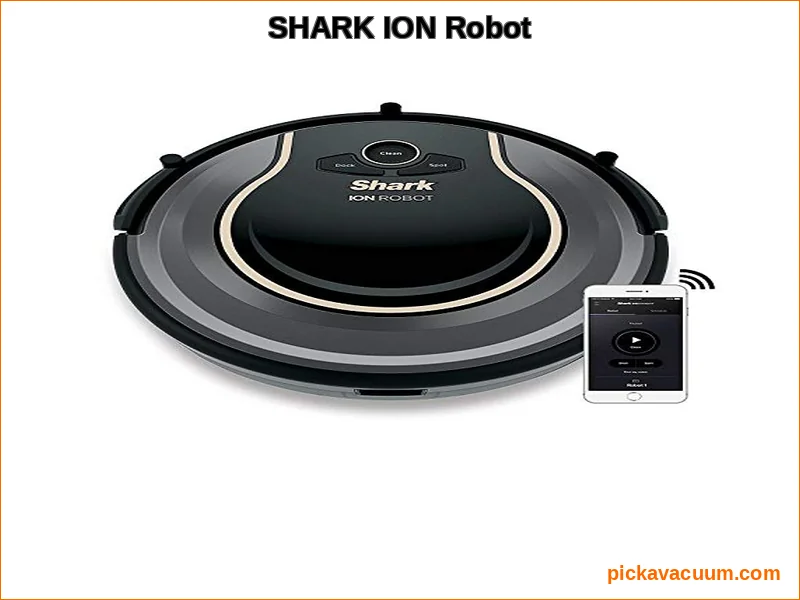
Shark Ion R75 Overview & Key Specifications
The Shark Ion R75 is a mid-tier robot vacuum focused on smart home integration and multi-surface cleaning. Its core promise is convenience through app and voice control, backed by Shark’s engineering for debris pickup. It’s positioned as a connected device that fits into a modern smart home ecosystem.
key specifications for the Shark Ion Robot R75:
| Feature | Specification |
|---|---|
| Model | Shark Ion Robot R75 |
| Navigation | Smart Sensor Navigation |
| Brush System | Tri-Brush System (Side Brushes, Channel Brushes, Multi-Surface Brushroll) |
| Connectivity | Wi-Fi Connectivity, SharkClean App, Amazon Alexa & Google Assistant |
| Control | App Scheduling, Voice Commands, Manual Start |
| Battery & Charging | Lithium-ion, Self-Charging via included dock |
| Dustbin | Bagless, removable |
| Filtration | HEPA filter (washable, included) |
| Accessories Included | Charging Dock, (2) Side Brushes, (1) Filter, (1) Battery, Boundary Strips |
| Warranty | 1-Year Limited Warranty |
| Check current price on Amazon |
Note: Some listings include boundary strips, while others may sell them separately. Always verify what’s in the box at purchase.
Key Features in Detail
The Smart Sensor Navigation allows the R75 to navigate around furniture and avoid most drop-offs. It doesn’t create a saved map of your home like some premium models; instead, it uses a systematic cleaning pattern and reacts to obstacles in real-time.
Its cleaning power comes from the Tri-Brush System. The two side brushes pull debris from edges and corners into the robot’s path. The main Multi-Surface Brushroll is designed to handle both carpets and hard floors without switching modes manually. This brushroll, along with channel brushes, aims to grab and lift different types of debris.
Wi-Fi Connectivity is a major selling point. Through the SharkClean app, you can start, stop, or schedule cleanings from anywhere. You can also use voice commands with Amazon Alexa or Google Assistant. The robot features Self-Charging; when the battery runs low, it automatically returns to its dock to recharge and can resume cleaning if needed.
Performance Testing: Carpet, Hardwood & Pet Hair
The true test of any vacuum is on your floors. We evaluated the Shark R75 cleaning performance across several common scenarios.
On Low to Medium-Pile Carpet
The robot does a respectable job on carpeted surfaces. The brushroll agitates the fibers well, pulling up embedded dirt and sand. It’s effective for daily maintenance cleaning, picking up surface litter, dust, and smaller debris. For deeply embedded pet hair or large piles of shed fur, you might need a more powerful pass or a dedicated best carpet vacuum for pets. The Multi-Surface Brushroll adjusts, but its performance on very thick, plush carpet will understandably be less thorough than on hard floors.
On Hardwood, Tile & Laminate
This is where the R75 shines. Hard floors are its ideal environment. The side brushes effectively kick out crumbs and dust from baseboards, and the suction pulls everything into the dustbin. It leaves a visibly clean path behind it. It’s quiet enough to run without being disruptive, making it perfect for a daily clean of kitchens and living areas. For those seeking a machine dedicated to hard surfaces, our guide to the best shark vacuums for hardwood floors offers more options.
Pet Hair Pickup
For households with cats or dogs, pet hair is a constant battle. The Shark Ion R75 handles loose pet hair on hard floors excellently. On carpets, it picks up surface hair well, though long strands can occasionally wrap around the ends of the brushroll, a common issue with many robots. Regular maintenance is key. If pet hair is your primary concern, a model from our list of the best shark vacuums for pet hair might be worth comparing.
The Shark robot vacuum R75 battery life is adequate for most apartments and medium-sized homes. In testing, it provided about 60-70 minutes of runtime on a mix of surfaces, which is typical for its class. It can clean multiple rooms before needing a recharge.
Setup, App Control & Smart Features
The Shark ion robot setup is straightforward. You charge the robot, download the SharkClean app, and connect it to your Wi-Fi network. This perspective aligns with insights from pick a vacuum, which emphasizes.The process is intuitive and should take under ten minutes.
SharkClean App & Wi-Fi
The app is the command center. Its interface is clean and simple. Key functions include:
- Starting or stopping a cleaning session instantly.
- Setting daily or weekly cleaning schedules.
- Viewing basic cleaning history (time and date of last run).
The shark ion r75 wifi connection was generally stable in our tests. However, the app’s functionality is basic compared to some competitors. There’s no interactive map, room-specific cleaning, or virtual no-go zones (outside of physical Boundary Strips). You get reliable scheduling and remote control, but not advanced smart mapping.
Voice Control & Smart Home Integration
Compatibility with Amazon Alexa and Google Assistant works as advertised. Simple commands like “Alexa, ask Shark to start cleaning” are effective. This integration makes it easy to trigger a clean as part of a routine or with a quick voice command, a nice convenience for a connected home.
Maintenance & Filter Care
Regular upkeep is minimal but essential. The dustbin is easy to empty. The washable HEPA filter should be rinsed every 1-2 months and fully dried for 24 hours before reinserting. A common user question is how to clean shark ion r75 filter: simply remove it, tap out loose dust, and rinse under cold water. Let it air dry completely.
For long-term ownership, knowing shark ion r75 accessories and replacement costs is wise. The primary wear items are the filter (part # XHF450), side brushes, and the main brushroll. These are readily available from Shark and third-party sellers. The official 1-year warranty covers defects in materials and workmanship, a standard period for robot vacuums.
Shark R75 vs. Competitors (Roomba, Eufy)
How does the Shark R75 compare in a crowded market? The shark r75 vs roomba comparison often comes up. A comparable iRobot Roomba, like the Roomba 600 series, offers similar random navigation but often at a higher price point. The Shark’s advantage is its Tri-Brush system and included Wi-Fi/app control at a potentially lower cost. However, iRobot’s ecosystem and proven navigation algorithms are highly refined.
Compared to a budget brand like Eufy, the Shark R75 typically offers stronger brand support and more consistent build quality. Many Eufy models excel in battery life and suction for their price but may lack the same level of Wi-Fi Connectivity and app features. The choice often comes down to whether smart features are worth the investment.
Even within the Shark family, you might wonder about the shark r75 vs shark iq robot. The IQ series generally features more advanced navigation with room mapping and selective room cleaning. The R75 is the more accessible, entry-point into smart robot vacuums from Shark. For a broader look at automated cleaners, see our roundup of the best automatic robot vacuum models.
Final Verdict: Pros, Cons & Who Should Buy It
After extensive testing, the Shark Ion R75 presents a clear value proposition with some trade-offs.
Pros
- Effective Multi-Surface Cleaning: Performs well on both hard floors and carpets for daily maintenance.
- Strong Smart Features: Reliable Wi-Fi, easy scheduling via app, and seamless voice control with Alexa/Google.
- Easy Setup & Maintenance: Getting started is simple, and routine care (emptying bin, cleaning filter) is hassle-free.
- Self-Charging & Resumption: Automatically docks and can resume cleaning, ideal for larger areas.
Cons
- Basic Navigation: Lacks smart mapping and room recognition, relying on a random pattern with sensor guidance.
- App Limitations: No virtual boundaries or interactive maps. Containment requires physical Boundary Strips.
- Struggles on Thick Carpet: While good on low-pile, deep cleaning high-pile carpets isn’t its strength.
- Brushroll Can Tangle: Long hair and string can wrap around the brushroll ends, requiring occasional manual cutting.
Who Is The Shark Ion R75 For?
This robot is an excellent fit for:
- Apartment Dwellers & Small Home Owners: Its battery life and navigation are well-suited to contained spaces with a mix of hard floors and area rugs.
- Smart Home Enthusiasts: If you want voice control and app scheduling integrated into your existing ecosystem, it delivers.
- Those Seeking Maintenance Cleaning: It’s perfect for daily or every-other-day runs to keep dust, crumbs, and pet hair under control between deeper manual cleans.
It might not be the best choice if you have very thick, wall-to-wall carpet, require precise room-by-room cleaning, or want advanced app features like no-go zones without physical strips.
So, is the shark ion r75 worth it? For the right user profile, absolutely. It automates the daily grind effectively. It connects to your smart home without fuss. While it doesn’t have the advanced brains of a mapping robot, its brawn and basic smart features are solid. For general upkeep in a connected home, it’s a strong contender. As with any appliance, understanding your specific floor types and cleaning needs, a principle often emphasized by cleaning experts, is the key to satisfaction. If your priority is set-and-forget convenience on mixed surfaces, the Shark Ion R75 deserves a close look.